
|
|
Getting started quickly |
|
Follow the steps below for a quick walk-through of how to localize a project.
Please also complete the online tutorial (from the Help menu, select Tutorial) to learn quickly how to use Alchemy CATALYST.
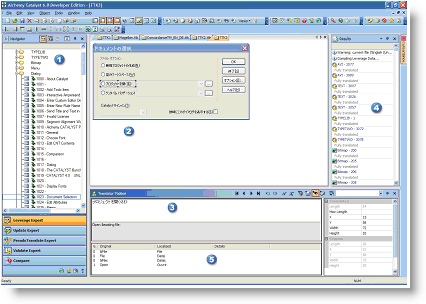
 The project environment consists of the following panes and toolbars:
|
|
Project Your project is where you manage and organize all the files that are to be localised. Navigator |
|
|
The Project Navigator pane displays the content of the project in an organized, hierarchical list. When a software application is inserted into a project for example, its individual components such as menus, dialogs, strings and bitmaps are displayed in the Project Navigator. These individual components are referred to as project items. |
|
|
Project Workspace |
|
|
The Project Workspace pane is where the project items displayed by Alchemy CATALYST. The Project Workspace can be displayed in String View Mode, WYSIWYG View Mode, Split-Horizontal View Mode, Split-Vertical View Mode and Statistics View Mode. Most of the manual localization engineering tasks such as layout and resizing are performed in this pane. |
|
|
Translator Toolbar |
|
|
The Translator Toolbar pane is where the items displayed in the Project Navigator and Project Workspace panes are actually translated. |
|
|
Results Toolbar |
|
|
The Results Toolbar pane contains the results of operations such as leverage, search and Todo items. Double-clicking on any item in this pane bring the user directly to the location that item. |
|
|
Reference Pane |
|
|
This pane is used to display suggested translations and glossary terms. Please refer to Using Active Translation Memories and Using Glossaries for more information on how to configure this pane. |
Alchemy CATALYST is designed as a flexible tool, and allows the user to customize the project environment in order to work more efficiently on localization projects.
Work on projects using the Translator toolbar
Analyze your project and determine project costs and schedule
|
|
The basics of the program can learned by watching demonstrations of commonly performed tasks. The video tutorials demonstrate how to create and pre-translate projects, generate project reports, validate projects and generate localized versions of projects. Open Alchemy CATALYST and selectHelp - Video Tutorials to access these tutorials . |
|
© Copyright Alchemy Software Development 2007 |
|
|


